Pricing and profitability
Configure labor pricing without distorting technician time
A labor rate determines what the customer pays for an hour of approved work. It is not the technician's wage, and changing it must not change how much time a technician actually spent on the vehicle. VMOTEK separates the customer sell rate, the shop's internal labor cost, billed hours, assigned hours and clocked hours so owners can price work consistently and still trust their profitability and technician-performance reports.
Written by the VMOTEK Product Team · Updated August 13, 2026
01
1. Why the labor rate matters
Labor is both a customer charge and a major source of gross profit. If the rate is too low, a busy shop can still lose money after technician compensation, payroll burden, training, equipment, rent, software and non-billable time. If the rate is inconsistent, customers receive different prices for comparable work and advisors cannot explain the quote. A configured labor-rate class gives the shop a repeatable starting rate whenever labor is added to a work order.
02
2. Sell rate is not technician pay
The sell rate is the price charged to the customer for one billed hour. Internal cost per hour is the shop's estimated cost of producing that hour and may include wages, employer taxes, benefits and other labor burden according to the shop's accounting policy. A technician earning $35 per clocked hour does not imply that labor should be sold for $35. The customer rate must also support non-billable time and the operating costs required to deliver the repair.
03
3. A worked labor-profit example
Assume the General labor class has a $150 customer sell rate and a $60 internal cost rate. A repair authorized for 2.0 billed hours produces $300 of labor revenue. Its modeled direct labor cost is $120, leaving $180 labor gross profit and a 60% gross margin before other overhead. The formula is: revenue = billed hours × sell rate; modeled cost = billed hours × internal cost rate; gross profit = revenue − modeled cost; gross margin = gross profit ÷ revenue. The internal cost is a management input, not a customer-facing line price.
04
4. Keep the different kinds of time separate
Pricing becomes misleading when a shop treats every hour value as the same fact. VMOTEK keeps the commercial quantity billed to the customer separate from scheduling and actual work time. That allows an owner to evaluate price, capacity and performance without rewriting one measurement to improve another.
- Guide hours: an external or internally established reference for how long a procedure normally takes.
- Billed hours: the quantity approved and charged on the work order.
- Assigned or scheduled hours: the capacity reserved for a technician or bay.
- Clocked hours: the technician's actual recorded working time.
05
5. Example: why efficiency is not the labor rate
Suppose a brake job carries 2.0 billed hours at $150 per hour, so labor revenue is $300. A technician completes it in 1.5 clocked hours. The billed-to-clocked efficiency is 133.3% because 2.0 ÷ 1.5 = 1.333. Increasing the sell rate to $160 would raise revenue to $320 but would not change the 1.5 clocked hours or the technician's measured efficiency. Similarly, changing billed hours must not rewrite actual clocked time. Price decisions and performance measurements answer different questions.
06
6. Decide which rate classes the shop truly needs
Begin with one company-wide General rate. Additional classes are useful only when the business has a real, repeatable pricing policy, for example Diagnostic, Specialty, Fleet Contract or Warranty. Do not create a class for every advisor, technician or individual repair. Too many classes make quoting unpredictable and weaken reporting. The current work-order flow automatically uses the configured applicable default when a new labor line is created; a manager can document an authorized transaction-level exception when necessary.
07
7. Open Pricing & Profitability
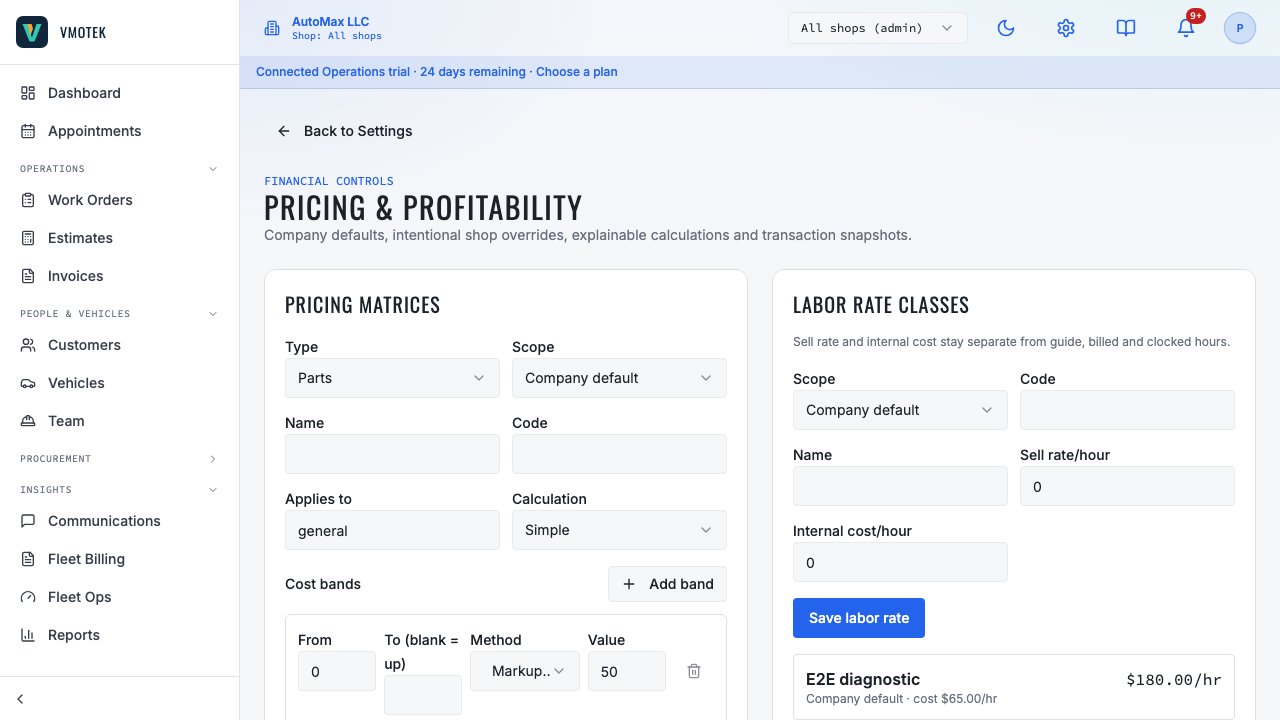
Sign in with a role permitted to maintain company settings. Select the Settings gear in the upper-right corner. Under Company, open Pricing & Profitability and locate Labor rate classes. Owners or administrators should maintain these values. Advisors should be able to build a work order using the resulting rate without changing company pricing policy.
08
8. Create the company General rate
Choose Scope = Company default. Enter Code = GENERAL and Name = General Labor. Enter the approved Sell rate/hour and Internal cost/hour, then select Save labor rate. Use a stable code because VMOTEK records the class code with the work-order labor pricing snapshot. A company default gives every shop a known starting point and prevents missing configuration when a new location is added.
09
9. Complete every labor-rate field
A labor-rate class describes a customer-pricing policy, not an employee. For the first company rate, the recommended values are Scope = Company default, Code = GENERAL and Name = General Labor.
- Scope: choose Company default for the standard rate available to all locations. Choose a shop name only when that shop has an approved location-specific rate.
- Code: enter a short, stable identifier such as GENERAL, DIAGNOSTIC, SPECIALTY or FLEET_CONTRACT. VMOTEK converts spaces to underscores and uppercase. The code is stored on work-order pricing snapshots and must be unique at the company or selected-shop scope. Do not put a technician name, dollar amount or year in the code.
- Name: enter the readable label that explains the policy to staff, such as General Labor, Diagnostic Labor, Specialty Labor or Acme Fleet Contract Labor. Name is for people; Code is the stable system and audit identifier.
- Sell rate/hour: enter the customer price for one billed labor hour, such as 150.00. Enter the hourly amount, not the price of a particular job and not the technician's wage.
- Internal cost/hour: enter the company's modeled cost of producing one billable labor hour, such as 60.00. Use the company's documented loaded-cost method. This value supports profitability analysis and is not the customer price.
10
10. Example entries
For a typical first setup, enter Code GENERAL, Name General Labor, Sell rate/hour 150.00 and Internal cost/hour 60.00 at Company default scope. If the business has a formally approved diagnostic policy, a second company class might use Code DIAGNOSTIC, Name Diagnostic Labor, Sell rate/hour 175.00 and Internal cost/hour 70.00. If only the San Jose shop needs a different General rate, select San Jose as Scope and create its approved General policy there rather than changing the company default for every shop.
11
11. Estimate internal cost responsibly
Internal cost should follow one documented company method. A simple starting method is technician wages plus employer payroll taxes and benefits, adjusted for the portion of paid time that can realistically be billed. For example, a technician whose loaded compensation is $45 per paid hour but who produces billable work during 75% of paid time has an effective billable-hour labor cost of approximately $60 ($45 ÷ 0.75). Confirm the accounting policy with the business's financial adviser; VMOTEK stores the value but does not decide the company's costing method.
12
12. Add a shop override only for a real difference
A company with multiple shops may have a location where market conditions, wage burden or an established contract justify a different General rate. Create another labor rate with the same meaningful class purpose, select the specific shop as Scope, and enter that shop's approved sell and internal cost rates. Work orders at that location use the shop configuration while other locations continue using the company default. Avoid an override merely because one advisor prefers a different number.
13
13. Example of company and shop pricing
Assume the company General rate is $150 sell and $60 internal cost. Two billed hours produce $300 revenue and $180 modeled gross profit. A downtown shop has an approved $165 sell rate and $68 internal cost because its labor market and operating cost differ. At that shop, the same two billed hours produce $330 revenue, $136 modeled cost and $194 modeled gross profit. The work-order shop determines which configured rate applies; the advisor should not have to remember the location policy.
14
14. Verify the rate on a work order
Create a test work order at the intended shop and add a labor line. VMOTEK initializes the line with the configured sell rate and stores a pricing snapshot containing the labor-rate class, sell rate, internal cost, shop scope and calculation time. Enter a description and billed hours, save the work order, and reopen it. Confirm that the labor amount equals billed hours × sell rate and that the expected company or shop rate was used.
15
15. Handle an authorized price exception
A fleet agreement, advertised service or manager-approved concession may require a different labor rate on one job. When an authorized user changes a calculated labor rate, VMOTEK requires a reason and retains the exception with the work-order pricing evidence. Use a specific explanation such as Fleet contract rate per agreement 2026-14 rather than a vague note such as customer asked. The change applies to that labor line; it does not rewrite the company or shop class.
16
16. Understand the reporting effect
Labor revenue reports use the billed labor amount. Profitability analysis can compare that revenue with the snapshotted internal cost basis. Technician productivity and efficiency should continue to use assigned and clocked time rather than inferring actual work time from the customer price. This separation lets a manager ask distinct questions: Are we charging enough? Are we scheduling effectively? Are technicians completing work efficiently? Did an override reduce expected margin?
17
17. Roll out and review safely
Test the company General rate before creating specialized classes. At each shop, create a test labor line for 0.5, 1.0 and 2.0 billed hours and confirm the calculated totals. Reopen the saved work order to verify the rate snapshot remains unchanged. Test one authorized override and confirm a reason is required. After rollout, review effective labor rate, override frequency, labor gross margin, billed-to-clocked efficiency and unapplied technician time as separate measures.
- Confirm every active shop resolves to an approved General rate.
- Document the source and review date of the internal cost assumption.
- Test shop overrides from a work order belonging to that exact shop.
- Do not change billed or clocked hours merely to force a desired profitability result.
- Review rates periodically and whenever wages, benefits or operating costs change materially.
18
18. Common questions
- Does changing a labor class reprice an existing saved work order? No. The saved pricing snapshot preserves the transaction's original basis.
- Is internal cost the technician's hourly wage? Not necessarily. It is the company's documented modeled cost per billable hour.
- Should each technician have a labor rate? Usually no. Rate classes represent customer-pricing policies, not employee identities.
- Can one shop use a different rate? Yes, when an administrator creates an intentional shop-scoped override.
- Does a higher labor price make a technician more efficient? No. Efficiency depends on billed or guide hours compared with actual clocked time, not the dollar rate.
Related product areas
Understand the capability behind the task
Continue to the applicable platform page for workflow behavior, role differences and connected operating consequences.
Ready to move forward?
Need help with your configuration?
Existing customers should use in-product support for account-aware assistance. Evaluation teams can contact us to discuss requirements.