Manage resources
Inventory management connected to every repair
Know what is on the shelf, what is committed to a work order, what is arriving on a purchase order and what each part contributes to job margin.
VMOTEK gives a single repair shop a complete parts inventory system connected directly to estimates, work orders, vendors, purchase orders, receiving and invoices. Item definitions are created once, physical quantities are recorded by lot and location, and every receipt, reservation, issue, adjustment and return appears in the item activity history. Staff can search by item number, description, vendor reference or category and immediately distinguish on-hand stock from committed, available, on-order and low-stock quantities.
The problem
A parts list is not the same as inventory control
A spreadsheet may say a shop owns six brake pads, but it cannot reliably explain whether two are already booked for tomorrow's work, three are arriving from a vendor, one was damaged or which cost should be used when the repair is invoiced. Without connected transactions, technicians wait, advisors promise unavailable parts and purchasing decisions are made from stale counts.
- Parts are added to work orders without checking available quantity.
- Committed stock is mistaken for stock that can be sold to another job.
- Purchase orders and receipts do not update the same inventory record.
- Adjustments overwrite a number without preserving who changed it or why.
- Catalog cost changes make historical job margin difficult to explain.
How it works
From item setup to consumed part
- 01
Create or import the item
Add the part number, description, category, unit of measure, cost, selling price, vendor reference, reorder quantity and optional batch details. A CSV upload with field mapping can establish an existing inventory list in bulk.
- 02
Find and reserve it for work
Search inventory while building an estimate or work order. VMOTEK shows on-hand, committed and available quantity so the advisor can use local stock or identify a shortage before promising completion.
- 03
Purchase and receive shortages
Create a purchase order from the vendor catalog or enter a direct PO line. Receiving records the actual quantity and cost against the PO and creates or increases the appropriate inventory lot.
- 04
Consume, bill and audit
When the part is fulfilled through the repair and invoice workflow, quantity is consumed from available lots and actual cost is preserved for parts COGS and margin. Item activity retains the full explanation.
What you get
Capabilities in this area
Fast part search
Search item number, description, vendor code and category from the inventory page or while pricing a repair. Filters surface low stock, archived records and relevant availability without scanning a spreadsheet.
On hand, committed and available
On hand represents physical quantity. Committed represents quantity booked for active work. Available shows what can still be promised, while on order identifies replenishment that has not yet been received.
Connected work-order parts
Parts selected for a job remain tied to the customer, vehicle, work order and invoice. Reservations protect stock during active work, and fulfillment records consumption at actual lot cost.
Purchase orders and receiving
Order missing or replenishment items from a vendor, follow PO status and receive full or partial quantities. Receiving updates stock and cost from the transaction instead of requiring a second inventory entry.
Item detail and maintenance
Update descriptions, pricing, reorder settings, vendor references, categories and other catalog attributes without recreating the item or losing its transaction history.
Lots, costs and traceability
Track receipt lots, quantity, actual unit cost, date and optional batch information. FIFO or selected-lot movement preserves the cost evidence behind inventory valuation and parts margin.
Controlled adjustments and returns
Record cycle counts, damage, shrinkage, found stock, corrections, new lots and customer part returns with a reason, shop, actor and timestamp instead of silently replacing the balance.
Reorder and value visibility
Low-stock indicators compare available quantity with reorder settings. Summary metrics show item count and inventory value so the owner can protect service levels without tying up unnecessary cash.
By role
What changes for each person
Service advisor
Confirm whether a part is truly available while creating the estimate, then communicate a realistic repair timeline.
Technician
See the parts attached to assigned work and avoid beginning a repair whose required stock has not arrived.
Parts manager or owner
Reduce emergency orders, explain every stock change and see inventory value, purchasing and parts margin as separate measures.
Inside VMOTEK
One item record across service and purchasing
Inventory is not a separate warehouse list. These screens show how the same part moves from setup and availability through repair demand, purchasing, receipt and auditable consumption.
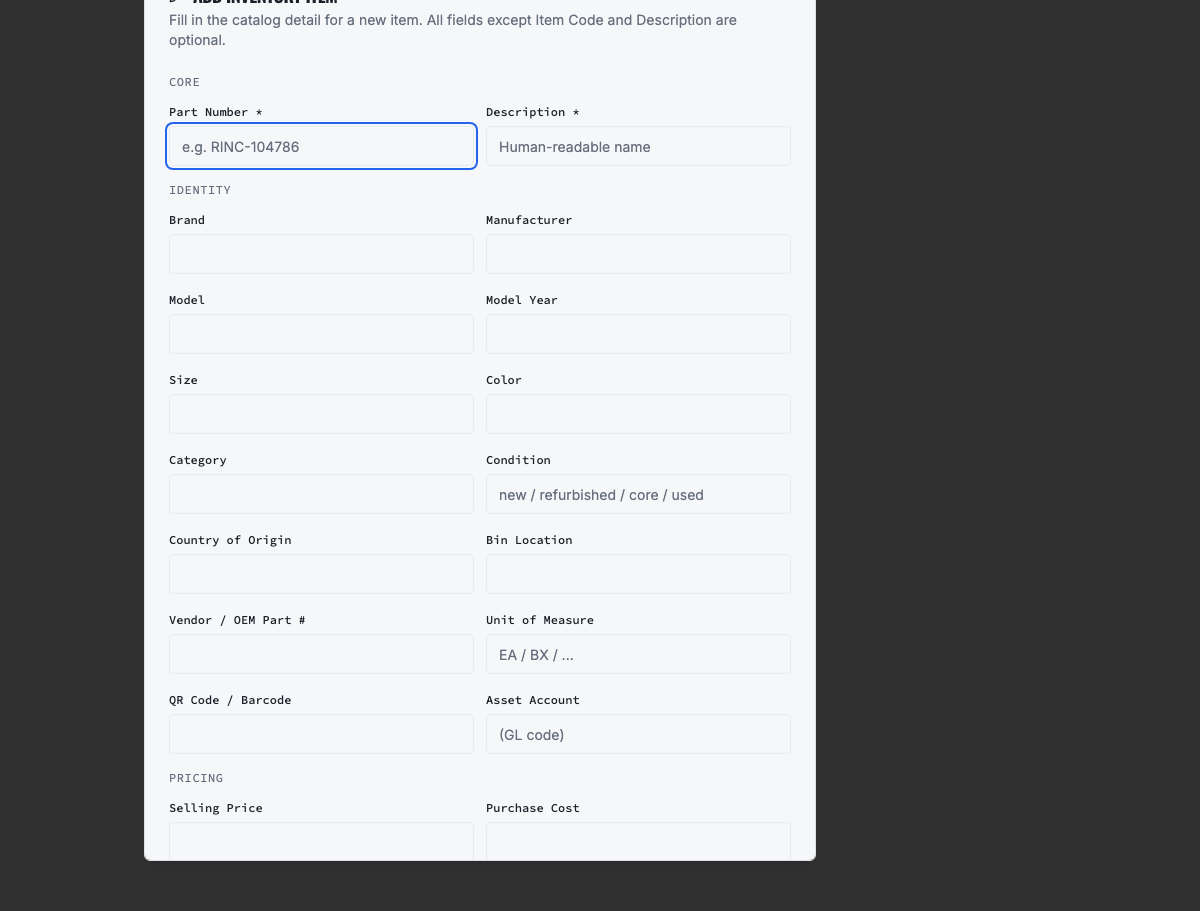
Create and maintain the item record
Keep the reusable part identity, pricing, category, reorder information and vendor reference in one place.
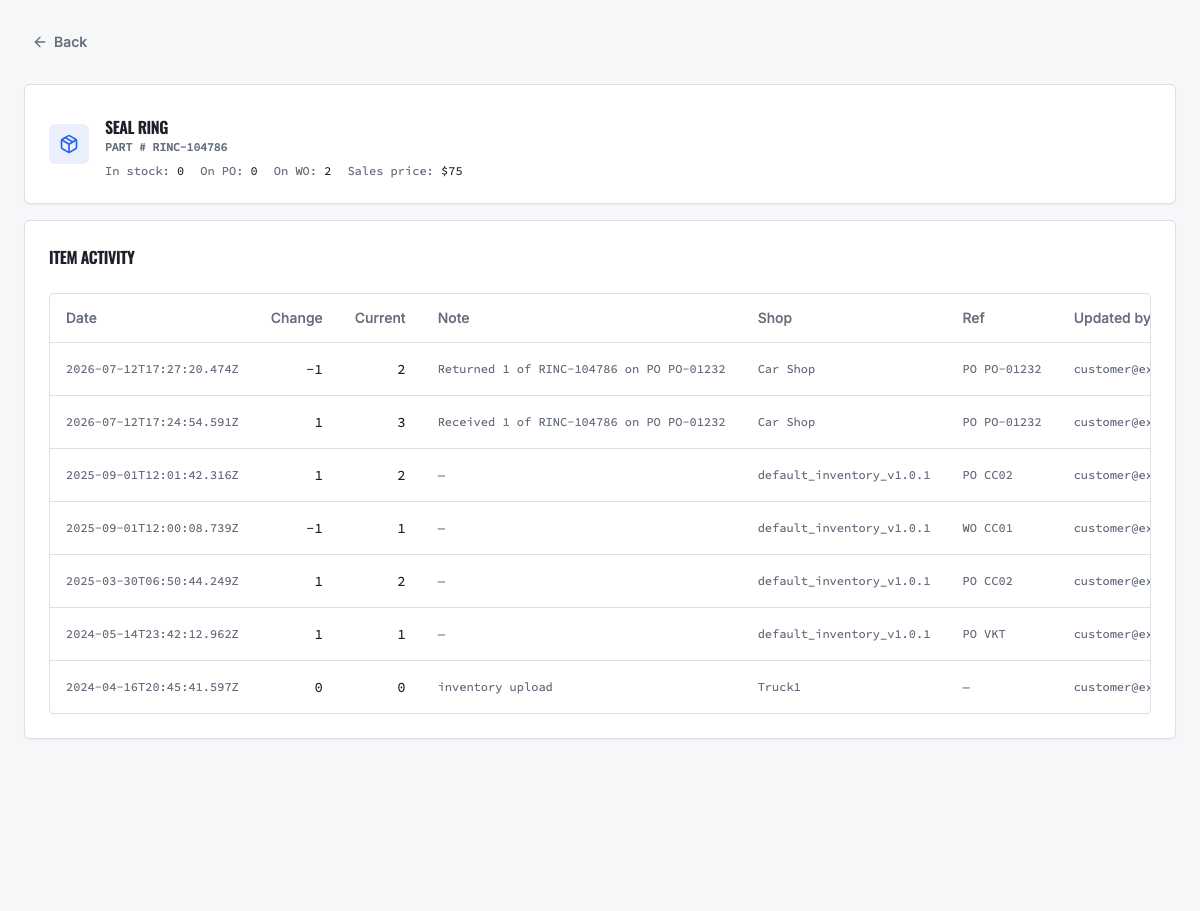
Explain every quantity change
Review receipts, reservations, issues, transfers, adjustments and returns in the item activity history.
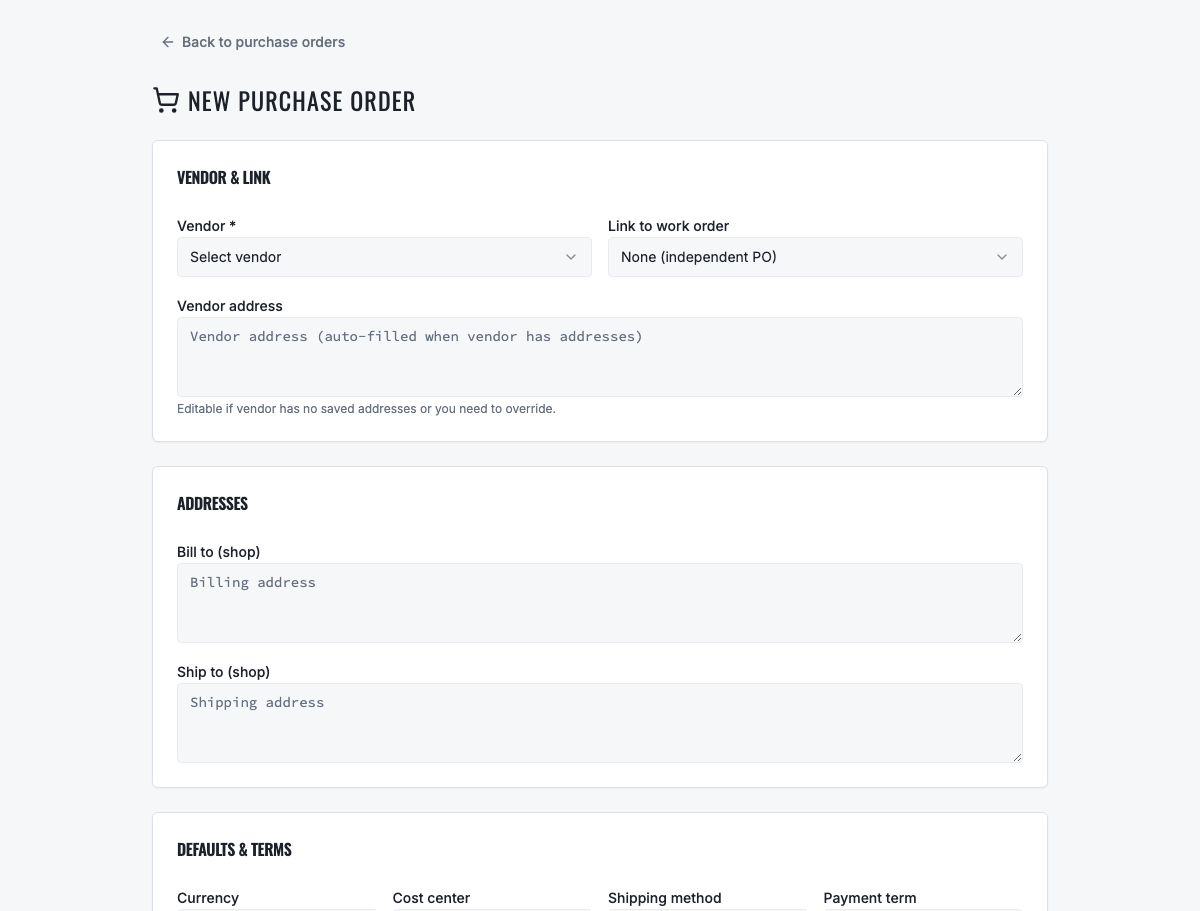
Replenish through a connected PO
Order a shortage and receive it into inventory without re-entering the item or delivered quantity.
Learn the workflow
Set up inventory with the operating guide
Use the detailed upload guide for required fields, CSV mapping, opening quantities and validation. Then follow the procurement guide when a repair or reorder signal creates purchasing demand.
Ready to move forward?
See the shop-to-fleet workflow
A personalized walkthrough of VMOTEK against your own operation. No pressure, no scripted pitch, bring the questions your team actually has.