Explainer
Judging AI claims in repair software
AI is not a business outcome. A useful capability helps a specific person make a better or faster decision, shows the evidence behind its recommendation and leaves consequential authority with the operator. Use this explainer to evaluate claims from VMOTEK or any other repair-software vendor.
Written by the VMOTEK Product Team · Product reviewed August 13, 2026
01
1. Separate automation, analytics and AI
Vendors often call every modern feature AI. Classify the capability before judging it. All three categories can create value, but they have different risks, evidence and testing requirements.
- Automation follows defined rules: send a reminder when a date is reached or create a task after a status change.
- Analytics calculates from structured data: price variance, overdue PM count, demand rollup or vendor on-time rate.
- AI interprets, predicts, matches, generates or recommends where the output is not completely defined by fixed rules.
- Ask the vendor to identify which category applies and which parts of the workflow do not use AI.
02
2. Define the exact user, decision and action
Replace a broad claim such as AI improves operations with one testable statement. Identify who sees the output, what decision it supports, what action may follow and what harm occurs when the recommendation is wrong.
- Buyer: combine selected requests, consider a vendor tier or flag an unusual price.
- Service advisor: turn technician findings into a clearer customer explanation.
- Fleet manager: prioritize overdue maintenance or repeat failures for review.
- Owner: identify exceptions that deserve attention rather than reading every transaction.
- A credible feature should not need the phrase it helps with everything.
03
3. Map every input and its quality
Ask what data produces the output and who owns its quality. A recommendation based on incomplete VIN, duplicate catalog items, stale inventory or missing service history may sound confident while being operationally wrong.
- Structured business data: vehicle, item, vendor, price, quantity, service and status history.
- User-entered evidence: complaint, technician note, inspection measurement and photo.
- External data: catalog, fitment, telematics, accounting or supplier availability.
- Derived data: matches, trends, forecasts, summaries and previous AI output.
- Require the product to identify missing or stale inputs instead of silently filling gaps with guesses.
04
4. Demand visible evidence and assumptions
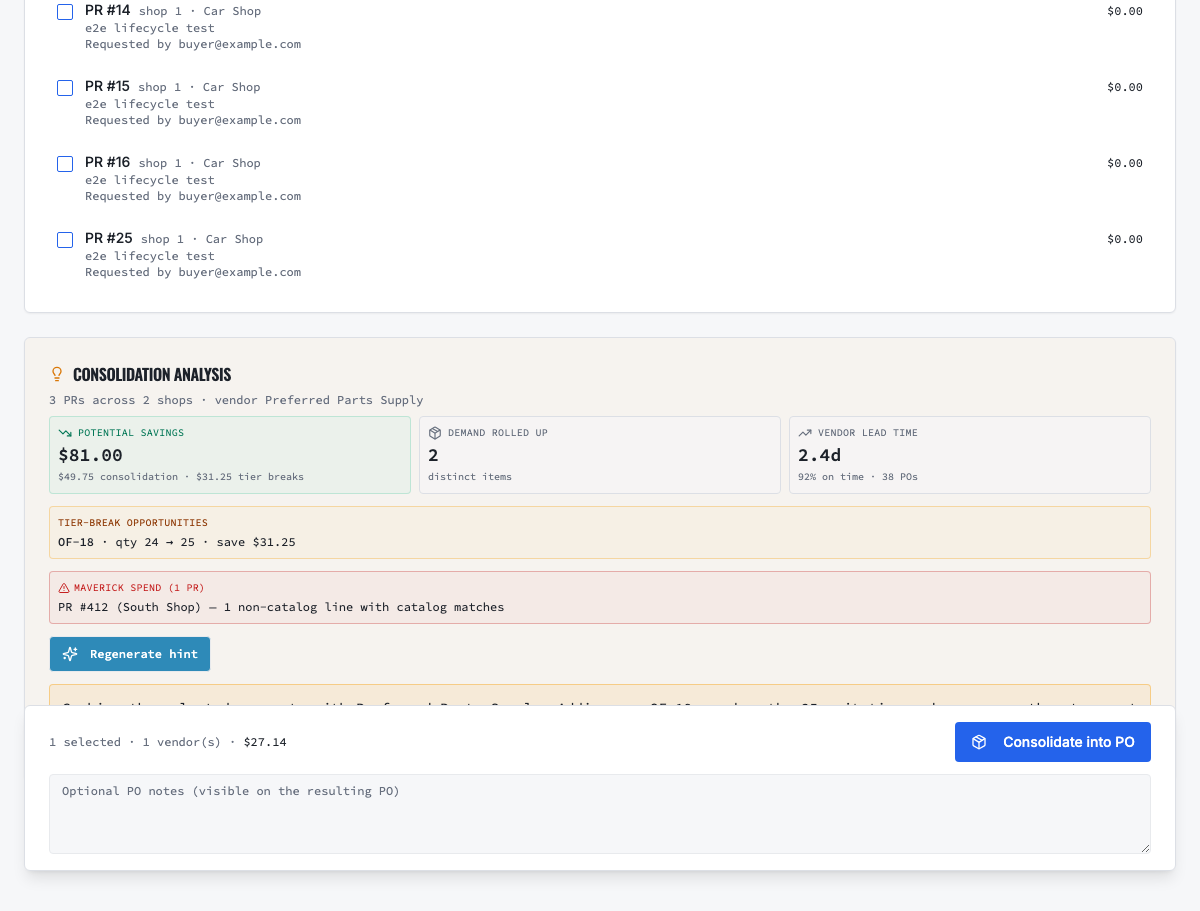
A user should be able to challenge a recommendation from the screen where it appears. Evidence may include historical median paid price, selected request quantities, vendor lead time, service records, source inspection measurements or catalog match confidence. The product should distinguish fact, calculation and generated explanation.
05
5. Understand confidence, uncertainty and abstention
Ask how the feature behaves when evidence is weak or contradictory. A safe system may show low confidence, request missing information, offer several candidates or decline to recommend. A product that always produces one polished answer can be more dangerous than one that sometimes says it cannot determine the result.
06
6. Keep authority with the operator
Document what the AI may suggest, draft or flag and what requires a person. High-impact actions involving customer authorization, safety, price, purchasing, inventory and maintenance should not become invisible automation.
- The buyer selects requests, vendor, quantities and whether to create the PO.
- The advisor verifies customer language, scope and complete price before sending an estimate.
- The technician or qualified reviewer owns diagnosis and inspection findings.
- The customer or authorized fleet contact owns the repair-approval decision.
- The system should record the underlying recommendation and the human action taken.
07
7. Test realistic failure cases
Build an adversarial test set before the sales demonstration. Use the same cases with every vendor and record the output, evidence, confidence, correction method and operational consequence.
- Incomplete or incorrect VIN and ambiguous vehicle configuration.
- Two catalog items with similar descriptions but incompatible fitment.
- Supplier price that is cheaper before freight but more expensive after delivery cost.
- Suggested quantity tier that creates excess stock or misses the needed-by date.
- Technician note containing shorthand, contradiction or unsupported diagnosis.
- Sparse maintenance history and an implausible odometer reading.
- Prompt-injection or malicious text embedded in an imported document or message.
08
8. Verify corrections and feedback behavior
Ask how a user corrects the recommendation and what happens next. The product should preserve the business record, distinguish user correction from original AI output and avoid silently treating every click as model-training consent.
- Can the user edit or reject the suggestion without breaking the workflow?
- Is the reason captured for later quality review?
- Does the correction change business data, future rules, a tenant-specific model or a generalized provider model?
- Can administrators inspect recurring false positives and disable the feature when necessary?
09
9. Review privacy and data-use boundaries
Identify every provider that receives customer, vehicle, employee, email, document, image or transaction data. Obtain contractual answers about retention, training, regional processing, subprocessors, security, deletion and incident response. Sensitive Google Workspace data has additional policy obligations when AI is involved.
- Does the provider use raw, aggregated or derived customer data to train generalized models?
- Is zero-data-retention available, enabled and contractually binding for the selected plan?
- Which data leaves the application, and is the minimum necessary data sent?
- Can the feature operate without sending Gmail or other Workspace content to an AI provider?
- Does the public privacy policy accurately describe the actual integrations and use?
10
10. Evaluate security and abuse controls
AI output must remain inside the same authorization boundaries as ordinary application data. Test whether users can obtain another shop's information through a prompt, generated report or recommendation. Review logging, rate limits, secret handling, content isolation and how untrusted external text is prevented from issuing commands.
11
11. Measure quality before ROI
Create a labeled test set representing normal and difficult cases. Define what correct means, who judges it and which errors are unacceptable. Measure precision, false-positive rate, abstention and reviewer agreement as appropriate to the use case. A time-saving feature that produces costly purchasing or safety mistakes is not efficient.
12
12. Run a controlled operational pilot
Choose one team, shop or workflow and compare it with the current process for a defined period. Keep human review mandatory during the pilot. Record adoption, corrections, exceptions and downstream outcomes, not only how often the feature was clicked.
- Procurement: sourcing time, price variance reviewed, recommendation acceptance and realized savings after freight and receipts.
- Estimate drafting: preparation time, advisor edits, approval time and customer clarification calls.
- Fleet exceptions: overdue work contacted, false alerts and PM completed on time.
- Inspection summaries: technician-to-advisor handoff time, corrections and customer comprehension.
13
13. Calculate complete operating cost
Include model usage, provider minimums, storage, integration fees, implementation, monitoring, human review, correction work and vendor support. Compare cost with the measured value of saved time, avoided variance, recovered work or reduced downtime. Do not count a recommendation as savings until the financial effect is realized.
14
14. Ask these questions in every demonstration
Require concise, written answers and then test them in the product.
- What exact decision does this improve, and for which role?
- Which inputs and providers produce the output?
- Show the evidence, assumptions and uncertainty behind this recommendation.
- What happens when required data is missing or conflicting?
- Which action can occur automatically, and which requires a person?
- Where is the recommendation and human decision logged?
- Is our data retained or used to train any generalized model?
- How do we disable, export or delete the feature and its derived data?
- What measured customer outcome supports the claim?
15
15. Watch for common red flags
Treat these statements as reasons to investigate, not proof that the product is unsafe or ineffective.
- It learns everything about your business without explaining the data path.
- The model is proprietary, so evidence and limitations cannot be shown.
- Accuracy is described with one percentage but no test population or error type.
- A generated explanation is presented as proof of the underlying recommendation.
- Roadmap features are mixed with currently available capabilities.
- The vendor cannot name downstream models, retention settings or training restrictions.
- AI is used to justify a premium price without a measurable operating outcome.
16
A good AI feature should pass this final test
The user understands what the feature does, can inspect the evidence, recognizes uncertainty, retains authority, can correct the output and can measure whether the resulting decision improved. The business understands where its data goes and what the capability costs. If those statements are not true, the feature is not ready to become an operational dependency.
Related VMOTEK workflows
Continue from the guide into the product
Use the capability pages for operating behavior, role differences, related guides, pricing and a product walkthrough.
Ready to move forward?
See the workflow in VMOTEK
Bring your current process and we will demonstrate where the platform fits, what changes, and what it does not yet support.