Data import guide
Upload vehicles by VIN and let VMOTEK decode them
A valid 17-character VIN is sufficient for VMOTEK's native vehicle importer. VMOTEK calls the NHTSA vPIC decoder and saves available year, make, model, trim and vehicle type. If a customer reference is supplied, the vehicle is linked to that customer; otherwise it is placed under the clearly labeled Unassigned Vehicle Imports customer for later assignment.
Written by the VMOTEK Product Team · Updated August 13, 2026
01
Prepare VINs
Use one row per vehicle and preserve the source file. Remove spaces and formatting marks, but never guess an unreadable character. VINs exclude I, O and Q. Importing the same VIN again updates its existing vehicle rather than creating a second vehicle.
- Required: serial_no containing a valid 17-character VIN.
- Optional: customer_email or customer_accno for owner matching.
- Import customers first when you want automatic ownership links.
- NHTSA data can be incomplete for unusual, non-road or non-North-American equipment; review every decoded result.
02
Open vehicle upload
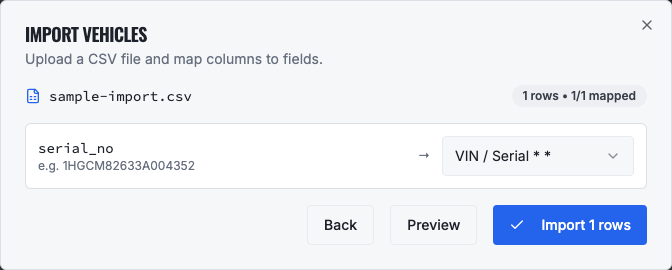
Select the Settings gear, open Company, choose Data Import and select the Vehicles tab. Download the template if needed, then choose Upload CSV.
03
Vehicle column dictionary
serial_no is the only required column. Additional columns let you connect ownership or preserve internal references.
- serial_no, required VIN and company-wide vehicle dedupe key.
- customer_email, matches a non-vendor customer's default contact email.
- customer_accno, alternate customer lookup when email is unavailable.
- description, optional display description; when blank, decoded year, make, model and trim are combined.
- manufacturer, optional override for decoded make.
- model, optional override for decoded model.
- assetnumber, fleet unit or internal asset number.
- asset_type, optional override for decoded vehicle/body type.
- asset_status, operational status; defaults to active.
- acquisiondate / warrantyexpiration, accepted template fields for legacy compatibility; verify support and results before relying on them in a production migration.
04
Customer assignment behavior
When customer_email or customer_accno resolves, VMOTEK links the vehicle to that customer. When neither is supplied or neither resolves, the database still requires a customer relationship, so VMOTEK creates or reuses Unassigned Vehicle Imports and attaches the vehicle there. This is deliberate: the vehicle remains searchable without being silently assigned to an arbitrary customer.
- Review the Unassigned Vehicle Imports customer after every VIN-only batch.
- Open each unassigned vehicle and move it to the correct customer before live service.
- Do not use the placeholder as a permanent fleet account or billing owner.
05
Verify decoded data
After the import completes, open Vehicles and search the VIN. Confirm year, make, model, owner and any unit number. For the sample VIN 1HGCM82633A004352, vPIC should identify a 2003 Honda Accord. Treat decoder data as assistance: a staff member should compare it with the vehicle before creating service records.
06
Troubleshooting
An invalid VIN row is rejected before database changes. A decoder network error leaves the row in the error result so it can be retried safely. If make/model is incomplete, verify the VIN directly against the vehicle and update the vehicle record. If ownership is wrong, correct the customer relationship rather than changing the VIN.
Related product areas
Understand the capability behind the task
Continue to the applicable platform page for workflow behavior, role differences and connected operating consequences.
Ready to move forward?
Need help with your configuration?
Existing customers should use in-product support for account-aware assistance. Evaluation teams can contact us to discuss requirements.