Company purchasing
Centralized procurement for multi-location repair businesses
Give a company buying team control and visibility without forcing shop operations into an unresponsive bottleneck.
VMOTEK lets locations create accountable demand while a central team reviews network stock, approvals and vendor options before issuing purchase orders. Local urgency and destination stay visible, and companies can still permit direct shop buying within defined authority.
The problem
Central control fails when it ignores local operations
A central team can negotiate and standardize purchasing, but an overly rigid process delays repairs. The system must preserve urgency and allow policy-based exceptions without losing accountability.
- Buyers receive incomplete requests from several channels.
- Shops bypass central purchasing when response is slow.
- Company contracts are missed during urgent ordering.
- Central receiving loses final shop allocation.
How it works
Central control with local accountability
- 01
Define policy
Set which locations and roles can request, approve, buy and receive.
- 02
Capture local demand
Shop records quantity, urgency, destination and repair context.
- 03
Review centrally
Buyer checks network stock, compatible requests and authorized vendors.
- 04
Handle exceptions
Permit documented direct buying when urgency and authority justify it.
- 05
Issue and receive
Create controlled POs and receive centrally or by destination.
- 06
Measure
Review spend, price variation, cycle time, transfers and policy exceptions.
What you get
Capabilities in this area
Central queue
Give buyers one view of submitted and approved demand across shops.
Policy-based authority
Separate request, approval, order and receipt permissions by role and location.
Exception path
Keep urgent local buying visible instead of encouraging off-system work.
Company analytics
Review purchasing and savings opportunities with location detail intact.
By role
What changes for each person
Central buyer
Control commitments and combine demand with the evidence needed to respond quickly.
Local manager
Submit complete requirements and see progress without surrendering legitimate urgency.
Leadership
Standardize where valuable and identify exceptions that signal process or supplier problems.
Use it in VMOTEK
Where to find this workflow and how to complete it
Centralized procurement combines policy, approved location demand, vendor grouping, analysis, PO approval and destination-aware receiving. It should increase buying control without erasing local urgency or ownership.
Where to find it
Locations work in Procurement → Purchase Requests. Central administrators use Procurement → Procurement and Procurement → PO Approvals. Purchase Orders controls vendor commitment and receipt; Inventory controls resulting location stock.
Who can use it
This workflow requires Connected Operations. Requesters, shop approvers, central administrators, PO approvers and receivers should have distinct permissions and only the shop scope required for their job.
Before you start
- • Configure company shops, role permissions and location assignments.
- • Create shared items, vendors and relevant vendor catalogs.
- • Define local-buy exceptions, approval thresholds, central receiving and transfer policy.
Step by step
Operate a central buying function without losing shop control
Button names and menu paths below match the VMOTEK repair application. Options appear according to the subscription, role and assigned shop.
- 1
Configure the operating policy
Decide who may request, approve, buy, consolidate, receive and transfer. Document which urgent or low-value needs may use direct local POs.
- 2
Capture shop demand
Each location creates purchase requests with item, quantity, timing, job context, proposed vendor and expected amount.
- 3
Approve the requirement
A shop or company approver validates necessity and budget. Approved demand becomes visible to central procurement; it is not yet ordered.
- 4
Review network alternatives
Central staff inspect Stock by shop, open POs, vendor group, cost history and urgency. Transfer existing stock when that is authorized and operationally better.
- 5
Consolidate compatible demand
On the Procurement page, select approved requests within one vendor group, review analysis and create the consolidated PO.
- 6
Apply PO approval
If the commitment exceeds authority or policy, use PO Approvals. The approver confirms vendor, destinations, quantities, totals and evidence.
- 7
Send and monitor
Email the approved PO to the supplier and use status filters to manage open commitments and expected deliveries.
- 8
Receive by physical destination
Receive directly into shops when shipped there. For central delivery, receive centrally and transfer quantity to each requesting shop.
- 9
Measure the outcome
Review procurement pipeline, PO summary, price context, receiving exceptions and inventory activity. Compare actual outcome with the original requests rather than reporting an unsupported savings claim.
What the system records
The operational result, not just the screen action
Demand-to-PO lineage
Shop requests and approvals remain connected to the consolidated vendor order.
Authority trail
Request approval, buyer consolidation and PO approval remain distinct accountable decisions.
Destination ownership
Receipt and transfer records show where stock physically entered and where it ultimately moved.
Common exceptions
- • Centralization should not delay vehicle-off-road or safety-critical parts; define an approved exception path.
- • Do not combine unrelated vendors or incompatible delivery requirements merely to reduce PO count.
- • A central buyer does not automatically have authority to receive or transfer for every shop.
- • Measure actual price, freight, delivery and handling outcomes before claiming realized savings.
Product screens
Recognize the workflow before you configure it
Screens may change as VMOTEK improves, but the records and control points shown here remain the basis of the workflow.
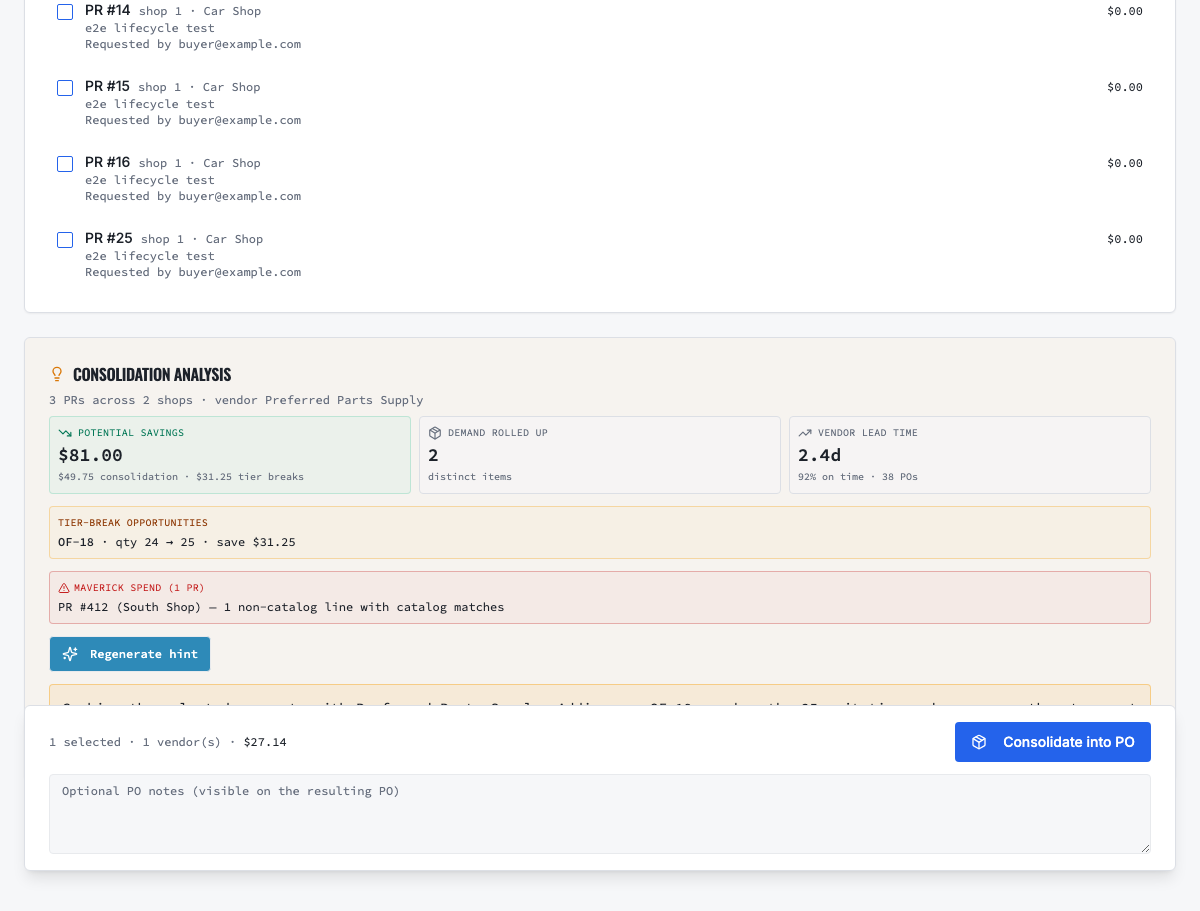
Select compatible approved demand, review sourcing evidence and create the controlled PO.
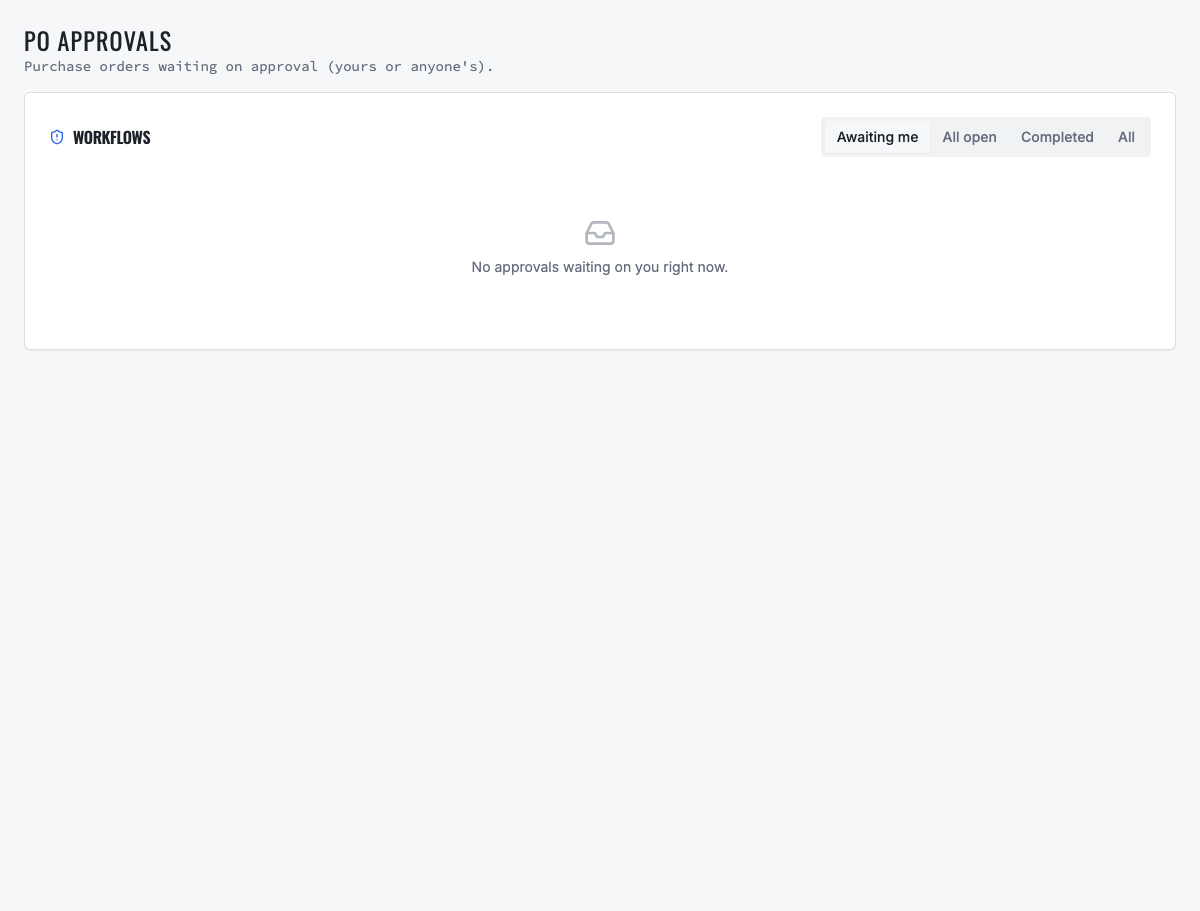
Orders requiring authority remain in a dedicated approval queue before vendor commitment.
Need the complete operating sequence? Read the purchase-order and consolidated-procurement guide →
Ready to move forward?
See the shop-to-fleet workflow
A personalized walkthrough of VMOTEK against your own operation. No pressure, no scripted pitch, bring the questions your team actually has.