Fleet parts purchasing
Parts procurement for shops that repair commercial fleets
Keep vehicle urgency, fleet authorization, parts demand and vendor commitment connected through the repair lifecycle.
VMOTEK connects a fleet vehicle's authorized repair work to inventory lookup, purchase requests, vendor sourcing, purchase orders and receiving. The shop can distinguish an urgent vehicle-off-road part from routine replenishment while retaining the fleet account and job behind the demand.
The problem
Fleet downtime changes the purchasing decision
A part for a revenue-producing vehicle cannot be evaluated only as inventory replenishment. Buyers need repair urgency, authorization and destination without bypassing purchasing control.
- Vehicle-off-road demand is mixed with ordinary stock orders.
- Fleet PO or authorization requirements are lost during sourcing.
- Parts arrive without a clear vehicle or shop destination.
- The fleet customer cannot relate delay to the repair status.
How it works
From fleet repair need to installed part
- 01
Record authorized repair
Keep vehicle, fleet account, work scope and required customer PO context.
- 02
Search stock
Check current shop and authorized network availability.
- 03
Request purchase
Capture urgency, quantity and repair relationship when buying authority is separate.
- 04
Source and approve
Review vendor and timing evidence while maintaining company authority.
- 05
Receive to shop
Post the delivered item to the location performing the work.
- 06
Consume and bill
Use the part on the connected work order and carry cost into invoicing and history.
What you get
Capabilities in this area
Vehicle context
Retain the unit and repair behind a job-specific purchase requirement.
Urgency visibility
Separate vehicle-off-road demand from routine replenishment.
Fleet authorization
Keep customer PO and approval requirements visible to the shop workflow.
Multi-shop sourcing
Use authorized network stock or purchasing according to location and timing.
By role
What changes for each person
Fleet service advisor
Explain whether the repair is waiting on authorization, transfer, order or delivery.
Buyer
Prioritize demand using actual vehicle and shop context.
Fleet customer
Receive clearer repair status and a service record tied to the correct unit.
Use it in VMOTEK
Where to find this workflow and how to complete it
Fleet repair procurement starts from the vehicle and work order. Keeping that context visible lets the advisor explain whether a unit is awaiting approval, stock transfer, vendor order or delivery.
Where to find it
Open Operations → Work Orders and select the fleet vehicle’s job. Add or search the required part there. Use Procurement → Purchase Orders or Purchase Requests for sourcing, then return to the work order after receipt.
Who can use it
Advisors and technicians follow their work-order permissions. Purchasing staff use Purchase Orders; Connected Operations teams may use Purchase Requests and Procurement. Fleet portal access does not grant internal purchasing authority.
Before you start
- • Create the fleet customer, vehicle and work order.
- • Record customer authorization or fleet PO requirements.
- • Maintain inventory and supplier records used by part search.
Step by step
Source a fleet repair part while preserving vehicle context
Button names and menu paths below match the VMOTEK repair application. Options appear according to the subscription, role and assigned shop.
- 1
Open the fleet work order
Confirm customer, vehicle, shop, service concern and authorization status before adding purchasing demand.
- 2
Search for the part
Use the work-order part search to review the company item, active-shop stock, authorized network stock, vendor catalog and purchasing history where available.
- 3
Choose stock, transfer or purchase
Allocate local stock when available. Transfer authorized network stock when operationally faster. Otherwise start a PO or purchase request.
- 4
Retain the repair link
When creating the PO from Purchase Orders, use Link to work order. This keeps the purchase connected to the unit and job requiring it.
- 5
Follow approval requirements
Record customer or fleet authorization separately from internal procurement approval. Both may be required before work proceeds.
- 6
Order and communicate status
Approve and send the PO, then use the job and communication history to explain that the repair is waiting on the part.
- 7
Receive and allocate
Receive the physical part into the servicing shop or transfer it there after central receipt.
- 8
Complete the repair and billing trail
Add the received part to the work order with correct cost and selling context, complete the repair, and retain it on the invoice and vehicle history.
What the system records
The operational result, not just the screen action
Vehicle and job
The part requirement remains associated with the fleet unit and specific repair.
Sourcing status
Staff can distinguish requested, ordered, partially received and available quantity.
Cost and billing
Purchasing cost, work-order part and fleet invoice retain a connected operational explanation.
Common exceptions
- • Fleet customer authorization is not the same as the shop’s internal PO approval.
- • Do not promise a completion date from a catalog result alone; confirm actual supplier availability.
- • If another shop supplies the part, record the transfer before the servicing shop allocates it.
Product screens
Recognize the workflow before you configure it
Screens may change as VMOTEK improves, but the records and control points shown here remain the basis of the workflow.
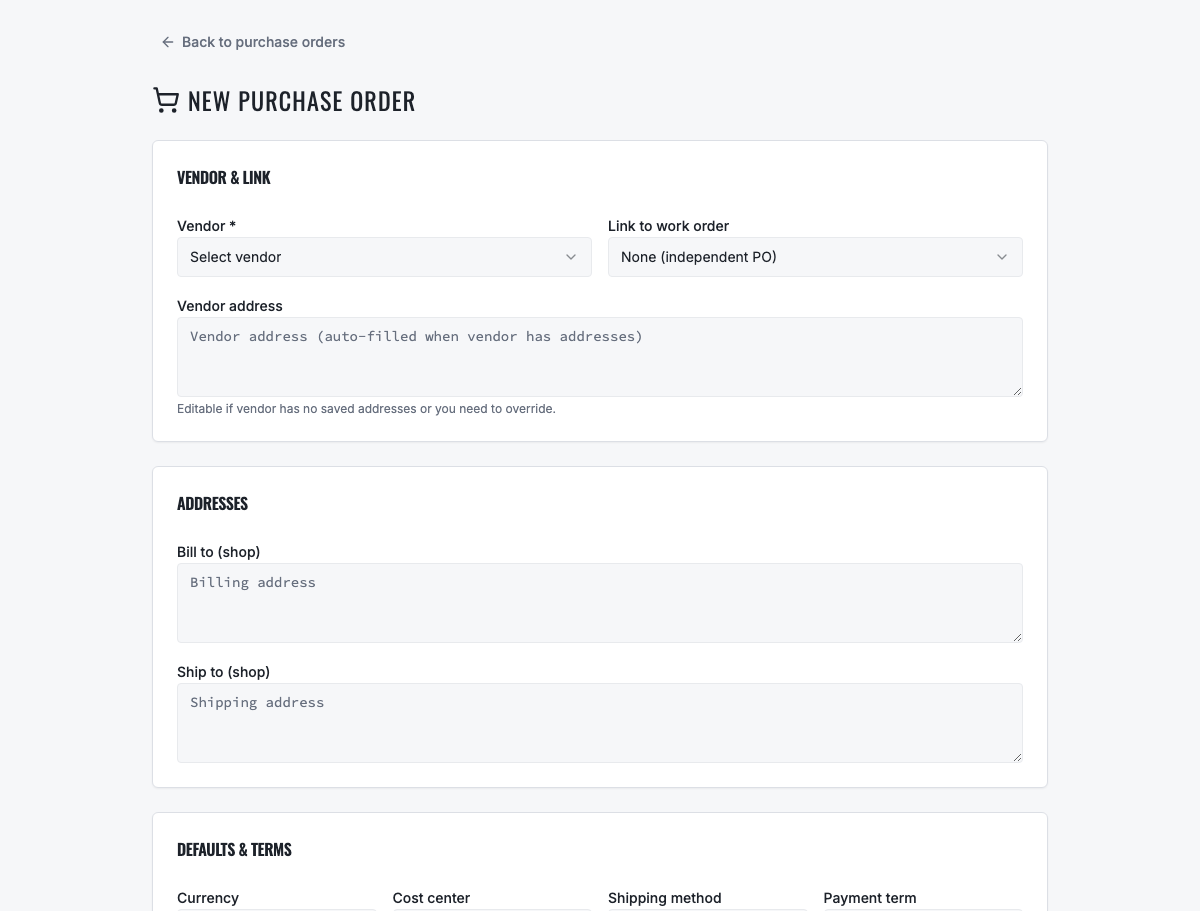
Link vendor commitment to the job requiring the part and preserve the destination shop.
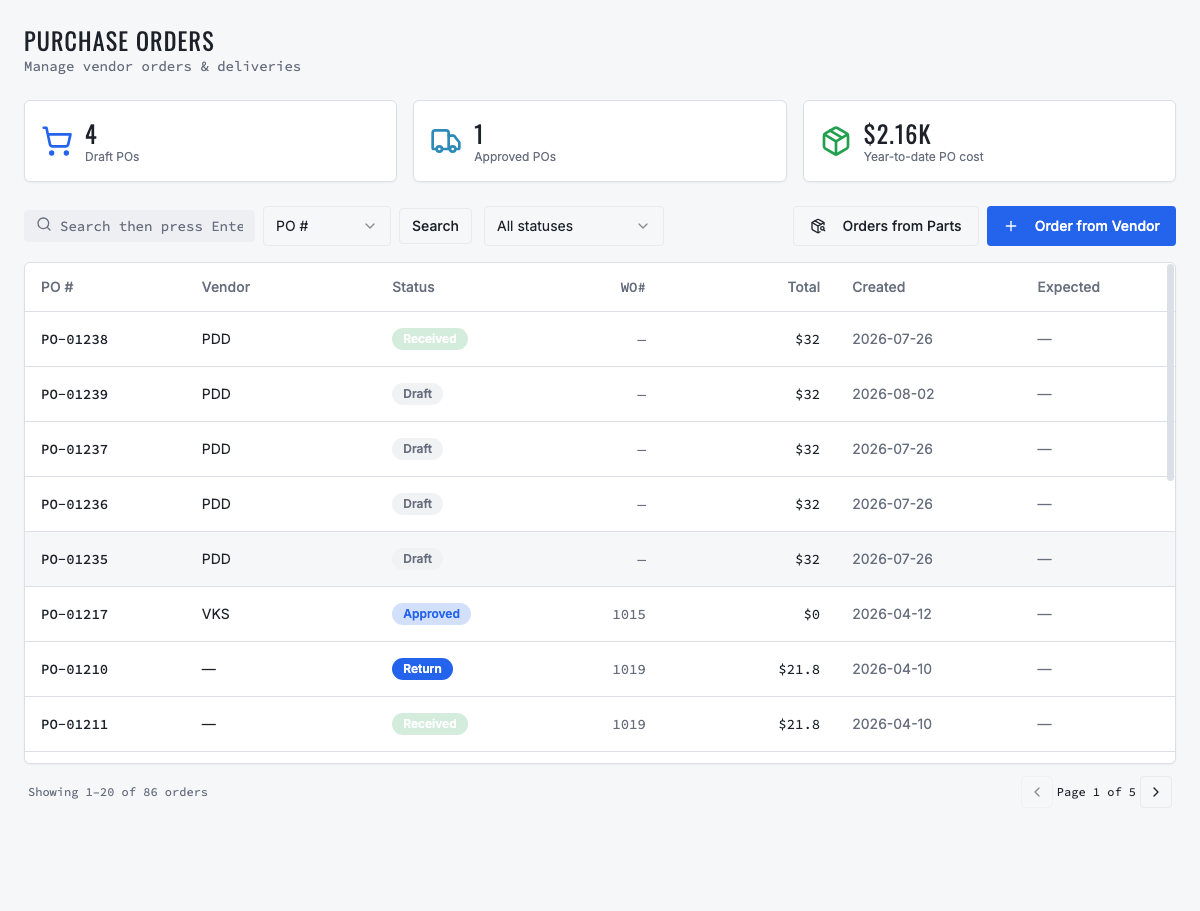
The detail page is the source of truth for approval, vendor delivery and receipt status.
Need the complete operating sequence? Read the purchase-order and consolidated-procurement guide →
Ready to move forward?
See the shop-to-fleet workflow
A personalized walkthrough of VMOTEK against your own operation. No pressure, no scripted pitch, bring the questions your team actually has.