Multi-shop inventory
Cross-shop parts inventory without duplicate item records
Define a part once for the company, track quantity where each shop owns it and let authorized users see network availability.
VMOTEK separates the shared product catalog from location-owned stock. A company creates one part record, each shop holds its own quantity and lots, and authorized users can see local, other-shop and total availability before transferring or purchasing.
The problem
Duplicating the part for every shop breaks the network view
Separate item records make the same brake pad look like unrelated products and hide the fact that another location may already own the required quantity.
- Part descriptions and prices drift by location.
- Company totals require spreadsheet reconciliation.
- A shop buys stock another shop could transfer.
- Activity history cannot follow one item across the network.
How it works
One catalog item, location-owned quantity
- 01
Create the item once
Define company-level part number, description and catalog attributes.
- 02
Receive by shop
Add physical quantity to the location that received and owns it.
- 03
Search local stock
Show the selected shop's on-hand, committed and available quantity.
- 04
See network availability
Authorized staff can see quantity at other shops without changing ownership.
- 05
Transfer
Move traceable quantity from source to destination when operationally approved.
- 06
Audit activity
Review receipt, adjustment, transfer and consumption history.
What you get
Capabilities in this area
Shared catalog
Use one product identity across the company instead of shop-specific duplicates.
Per-shop balances
Track the quantity and lots owned at each authorized location.
Network lookup
See what another shop has before placing a rush order.
Traceable movement
Record source, destination, quantity, actor and reason for transfers and adjustments.
By role
What changes for each person
Advisor
Know whether the required part is local, elsewhere in the network or needs purchasing.
Parts manager
Move real quantity without duplicating catalog definitions or silently editing totals.
Owner
See network investment and reduce unnecessary emergency purchasing.
Use it in VMOTEK
Where to find this workflow and how to complete it
VMOTEK defines an item once in the company catalog and tracks physical quantity separately for every shop. This prevents duplicate item masters while preserving location ownership.
Where to find it
Expand Procurement and select Inventory. Search the shared item, open its detail, and read Stock by shop. Use the top-bar shop selector to work in a location context without losing authorized network visibility.
Who can use it
Inventory visibility follows the Inventory module and shop assignment. Cross-shop totals and actions are available only to roles with appropriate company or location authority.
Before you start
- • Create one company item using a stable part number and description.
- • Create all shops and assign staff to the correct locations.
- • Receive, transfer or adjust quantity through controlled inventory actions.
Step by step
Find an item and understand who owns the stock
Button names and menu paths below match the VMOTEK repair application. Options appear according to the subscription, role and assigned shop.
- 1
Open Inventory
Use Procurement → Inventory and search by part number, name, description or supported catalog context.
- 2
Select the shared item
Open the item rather than creating another copy for a second shop. Confirm part number, unit, selling price and purchase cost.
- 3
Read total and Stock by shop
The top total summarizes the company quantity; the Stock by shop panel identifies the location that physically owns each amount.
- 4
Review catalog details
Check brand, manufacturer, fitment, alternates, bin, reorder settings and other item attributes shared by the company.
- 5
Choose the correct action
Use Transfer to move existing quantity, Adjust for a counted correction with reason, or Purchase Orders when the company needs additional stock.
- 6
Review activity
Choose View activity to see receipts, transfers and adjustments rather than relying on the current balance alone.
- 7
Use the part on repair work
Part search from a work order uses the shared item and shop-aware availability so staff can decide whether to allocate, transfer or purchase.
What the system records
The operational result, not just the screen action
One item master
Description, identifiers, fitment and shared catalog attributes are maintained once for the company.
Per-shop balance
Every location retains its own on-hand quantity even though users search one catalog.
Inventory ledger
Receipts, transfers and adjustments explain how the current quantity was produced.
Common exceptions
- • Do not create the same item again merely because another shop receives it.
- • Network visibility does not automatically grant permission to transfer another shop’s stock.
- • A vendor catalog result is an offer, not owned inventory.
- • Use adjustment for a physical count correction, not to hide an unrecorded transfer or receipt.
Product screens
Recognize the workflow before you configure it
Screens may change as VMOTEK improves, but the records and control points shown here remain the basis of the workflow.
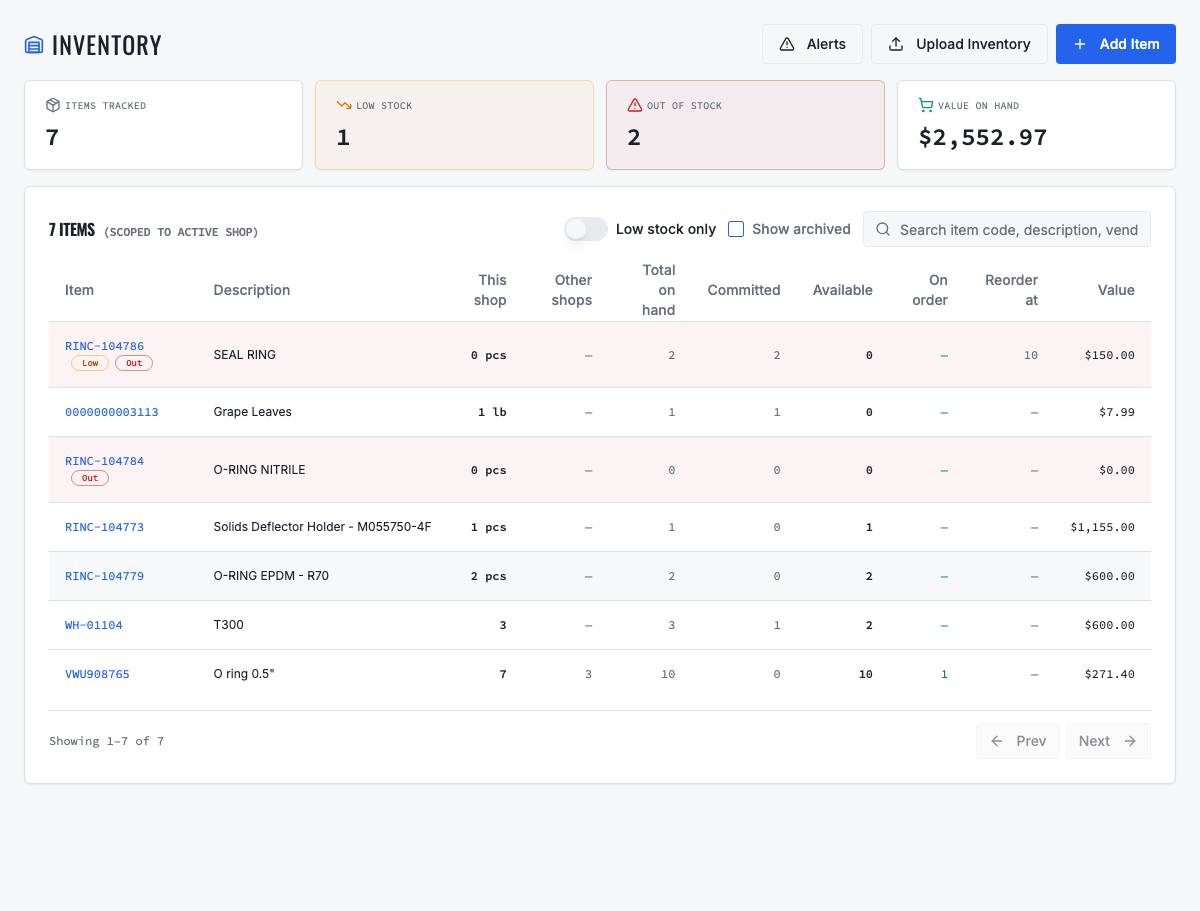
The item is defined once while physical quantity remains owned by each shop.
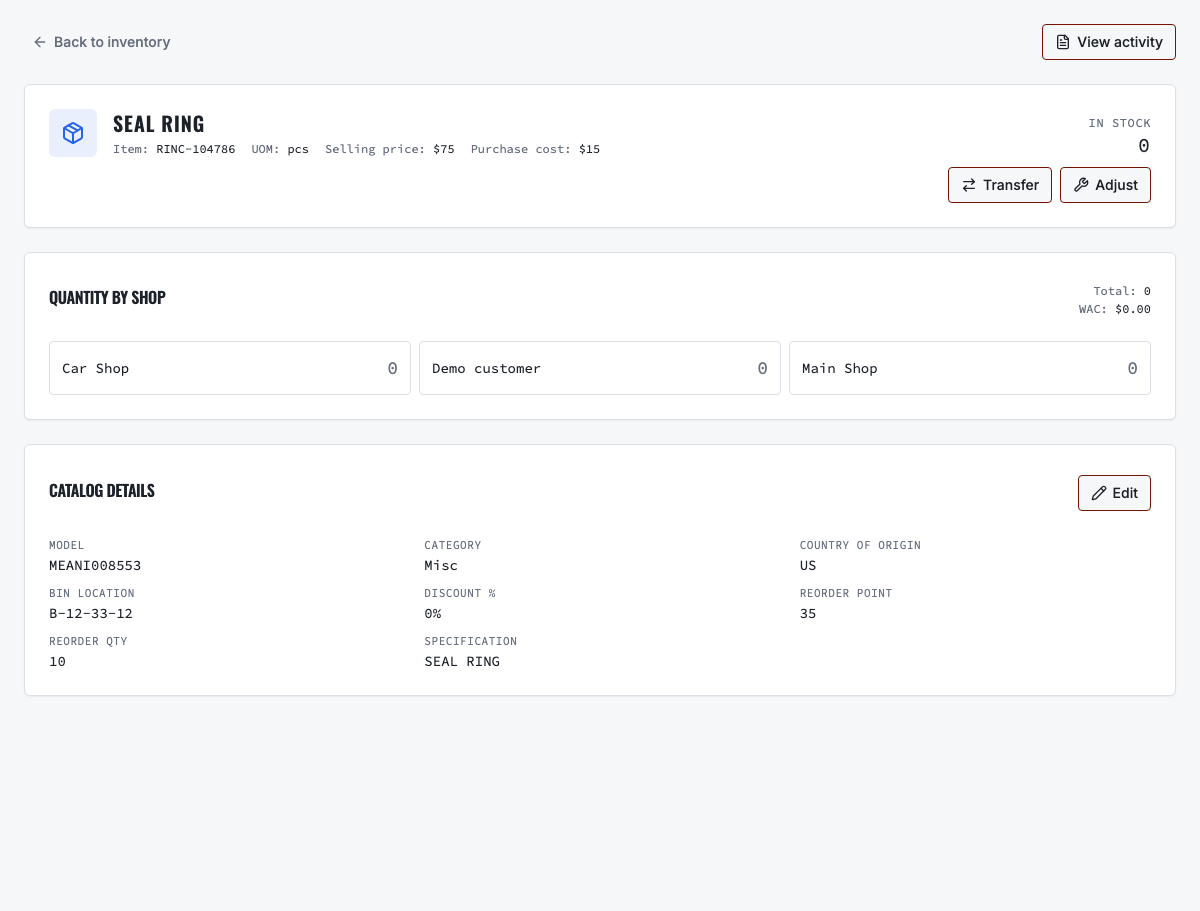
Authorized users can see total quantity and the location that physically owns it.
Need the complete operating sequence? Read the purchase-order and consolidated-procurement guide →
Ready to move forward?
See the shop-to-fleet workflow
A personalized walkthrough of VMOTEK against your own operation. No pressure, no scripted pitch, bring the questions your team actually has.