Purchasing controls
Purchase-request approval workflow for repair operations
Let the person closest to the repair describe the need while an authorized buyer controls the commitment.
A VMOTEK purchase request records what a shop needs before it becomes a vendor commitment. Authorized staff approve, reject or return the request, and approved lines can become a direct or consolidated purchase order with the original requester and shop retained.
The problem
Demand and authority are different responsibilities
An advisor or parts employee may understand the operational need but should not automatically have authority to select a supplier or commit company funds above policy limits.
- Uncontrolled requests become supplier orders without review.
- Approvers receive incomplete descriptions over chat or phone.
- Rejected demand has no durable reason or follow-up path.
- The final PO cannot be traced to the original need.
How it works
A visible path from need to commitment
- 01
Create request
Record shop, part, quantity, required timing, repair context and suggested vendor when known.
- 02
Submit
Move the draft into an accountable review queue.
- 03
Review
Approver checks necessity, authority, stock elsewhere, price evidence and timing.
- 04
Decide
Approve, reject or return for clarification with a recorded reason.
- 05
Source
Buyer chooses direct ordering or combines compatible approved requests.
- 06
Link the PO
Keep the request status and resulting purchase-order line connected.
What you get
Capabilities in this area
Role separation
Permit operational staff to request without granting vendor commitment authority.
Shop boundary
A request is created for the location that needs the part and follows that shop's access rules.
Recorded decision
Retain approver, status and context rather than relying on an informal yes.
PO conversion
Carry approved demand into purchasing without retyping the item and destination.
By role
What changes for each person
Requester
Explain the requirement once and follow it through review and ordering.
Approver
Review consistent information and retain the reason for the decision.
Buyer
Work from approved demand instead of reconstructing needs from messages.
FAQs
Frequently asked questions
Use it in VMOTEK
Where to find this workflow and how to complete it
A purchase request documents demand without granting supplier commitment authority. It is useful when advisors, technicians or location staff identify a need and a manager or central buyer decides how to source it.
Where to find it
Expand Procurement and choose Purchase Requests. Select New Purchase Request to enter demand. Open an existing request from the queue to review its history, status and resulting PO.
Who can use it
Purchase Requests require the Connected Operations entitlement and the Purchase Request module permission. Approval is limited to users with the configured authority and applicable shop access.
Before you start
- • Assign requesters, approvers and buyers distinct roles.
- • Create the item and vendor when known; otherwise provide enough description to source it.
- • Agree what information and approval threshold the company requires.
Step by step
Request a part without bypassing purchasing controls
Button names and menu paths below match the VMOTEK repair application. Options appear according to the subscription, role and assigned shop.
- 1
Open New Purchase Request
Go to Procurement → Purchase Requests and choose New Purchase Request.
- 2
Identify the shop and need
Confirm the requesting location, add the item or description, quantity, required timing and operational reason. Link job context when the demand comes from a repair.
- 3
Add sourcing context
Select a proposed vendor and expected unit amount when known. These are inputs for review, not authorization to order.
- 4
Save and submit
Review the request and submit it. A saved draft remains editable; a submitted request enters the review workflow.
- 5
Approve, reject or return
The approver opens the request, checks company and network stock, necessity, expected cost and authority, then records the decision. Returned requests should explain what information is missing.
- 6
Choose the buying path
An authorized buyer can act directly when appropriate or leave approved demand for Procurement consolidation with compatible requests.
- 7
Follow the resulting PO
When consolidated, the request detail displays the PO and consolidation date. Use that PO for vendor commitment and receiving rather than editing the historical request.
What the system records
The operational result, not just the screen action
Original demand
Shop, requester, item, quantity, amount, reason and timing remain visible.
Approval decision
The request status communicates whether demand is draft, submitted, approved, rejected, consolidated or closed.
Purchasing outcome
A consolidated request points to the PO that now controls the vendor commitment and receipt.
Common exceptions
- • A submitted request is not a purchase order and should not be represented to the supplier as a commitment.
- • If the request lacks a vendor, the consolidating administrator must choose one before creating the PO.
- • If another shop has authorized stock, consider transfer before approval of a new purchase.
Product screens
Recognize the workflow before you configure it
Screens may change as VMOTEK improves, but the records and control points shown here remain the basis of the workflow.
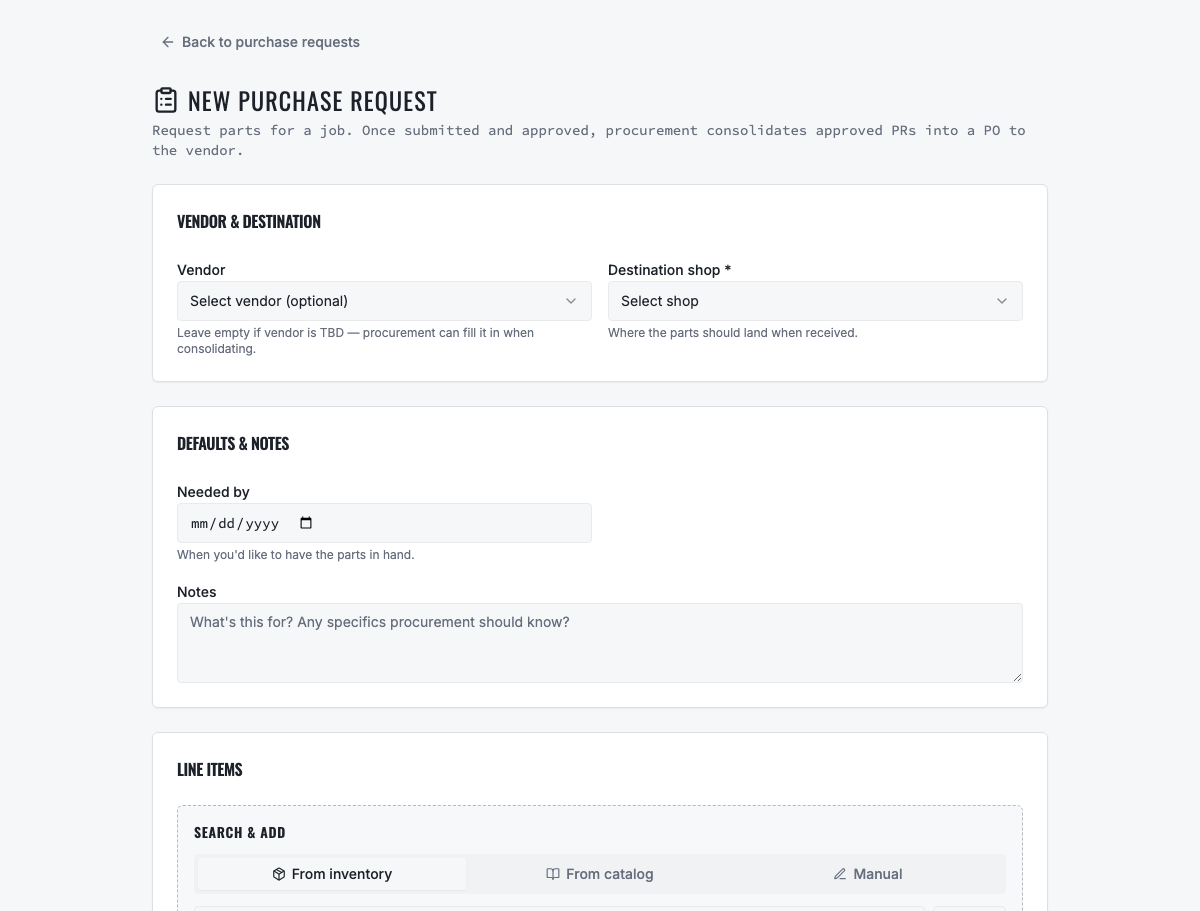
The request records the shop need before an authorized buyer commits company funds.
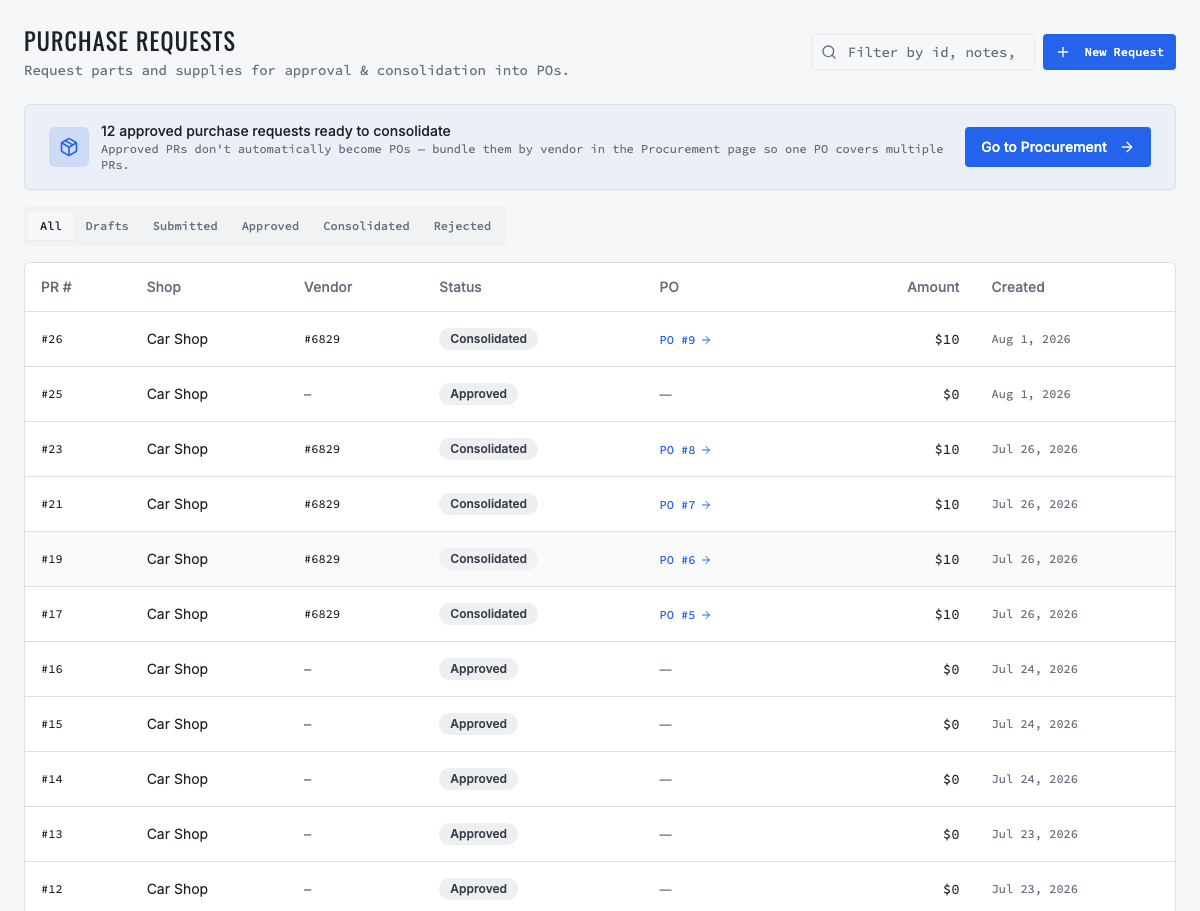
Approved requests remain visible until they are ordered directly or consolidated.
Need the complete operating sequence? Read the purchase-order and consolidated-procurement guide →
Ready to move forward?
See the shop-to-fleet workflow
A personalized walkthrough of VMOTEK against your own operation. No pressure, no scripted pitch, bring the questions your team actually has.