Supplier operations
Vendor management for repair shops
Keep the supplier relationship, catalog context and purchasing history connected instead of rebuilding vendor information on every order.
VMOTEK stores vendor identity, contacts, account context and purchasing records alongside catalogs and purchase orders. Buyers can identify the supplier used for an item, review prior commitments and carry known information into the next order.
The problem
A vendor name alone is not enough
Repair businesses need to know which account, contact, location and catalog applies, along with what was ordered and received previously.
- Contacts and account details live in personal inboxes.
- The same supplier is created repeatedly with different names.
- Buyers cannot see prior price and order context.
- New staff do not know which vendor serves which shop.
How it works
Create a usable supplier record
- 01
Create vendor
Record the legal or trading name and the locations authorized to use it.
- 02
Add contacts
Separate ordering, account and service contacts where needed.
- 03
Record terms
Capture operational notes, currency, shipping and account expectations.
- 04
Load catalog
Associate searchable vendor items and current cost context.
- 05
Create POs
Carry the vendor and selected items into a controlled commitment.
- 06
Review history
Use prior orders and receipts when evaluating future sourcing.
What you get
Capabilities in this area
Contact management
Keep ordering and account contacts available to authorized staff.
Location availability
Define which shops can use the vendor without duplicating the company record.
Catalog association
Connect supplier items and references to the vendor that provides them.
PO history
Review commitments and receipt history from the same supplier record.
By role
What changes for each person
Buyer
Find the correct supplier context quickly and avoid recreating records.
Shop manager
Know which approved suppliers serve the location and what is already ordered.
Finance
Use consistent vendor identity across commitments and accounting handoffs.
FAQs
Frequently asked questions
Use it in VMOTEK
Where to find this workflow and how to complete it
The vendor record supplies consistent identity, contacts, addresses and purchasing context to the PO workflow. Create the supplier once rather than typing a different name on every order.
Where to find it
Expand Procurement and select Vendors & Catalogs. Use Add Vendor for one supplier, Upload vendors for a mapped import, or select a vendor row to open its detail.
Who can use it
Users need the Vendor module permission. Restrict vendor maintenance to staff responsible for supplier data; purchasers can then use approved records in purchase orders.
Before you start
- • Gather the vendor name, ordering contact, email, phone and address.
- • Decide whether the supplier is available company-wide or for specific shops.
- • Deduplicate names and account records before importing a large file.
Step by step
Create and maintain a supplier used by purchasing
Button names and menu paths below match the VMOTEK repair application. Options appear according to the subscription, role and assigned shop.
- 1
Open Vendors & Catalogs
Use the Procurement navigation and search first to make sure the supplier does not already exist.
- 2
Choose Add Vendor
Open the New Vendor form for an individual supplier, or choose Upload vendors for a CSV file.
- 3
Enter identity and contacts
Record the vendor’s display name, ordering contact, email, phone, website and relevant address. Use stable account information instead of an employee’s personal note.
- 4
Save and verify
Return to the vendor list, search for the new supplier and open the record. Confirm that purchasing staff can recognize the correct vendor.
- 5
Add or import catalog information
Open Catalog when supplier items should be searchable. Keep the vendor offer separate from the company item and physical shop stock.
- 6
Use the vendor on a PO
Create a purchase order and select the vendor. Review the address and contact inherited by the order before sending it.
- 7
Maintain, do not duplicate
Update the existing vendor when contact or address information changes. Preserve order history under one supplier identity.
What the system records
The operational result, not just the screen action
Supplier identity
Name and stable identifiers reduce duplicate vendor records and fragmented purchasing history.
Ordering contact
Email, phone and address are available when preparing and delivering a PO.
Purchasing relationship
Catalog offers and purchase orders remain associated with the supplier.
Common exceptions
- • Uploading a vendor file is not the same as importing a vendor catalog; they create different kinds of records.
- • Do not create a second vendor simply because another shop uses a different contact, maintain the shared supplier context where appropriate.
- • If the PO address is unusual for one order, review whether to override the order or correct the vendor master record.
Product screens
Recognize the workflow before you configure it
Screens may change as VMOTEK improves, but the records and control points shown here remain the basis of the workflow.
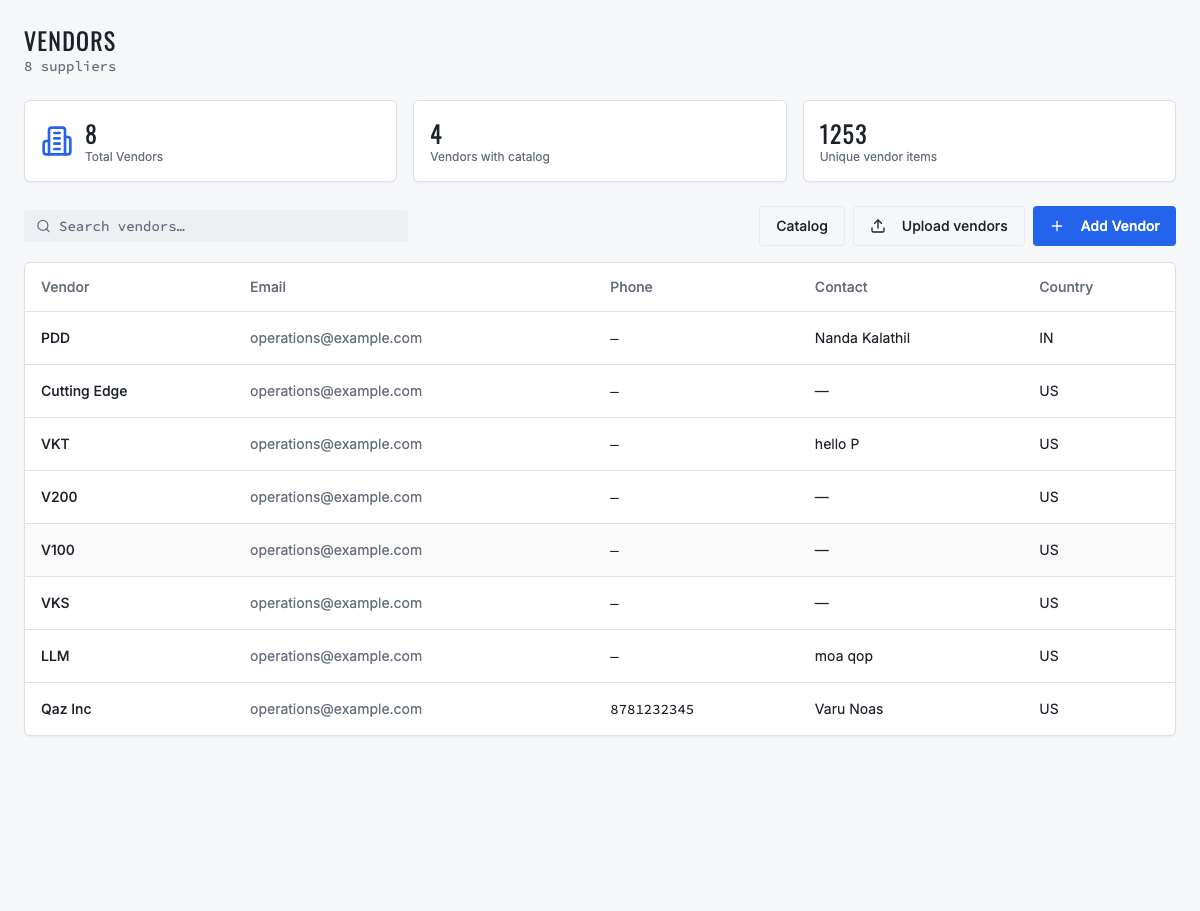
Search suppliers, open their records, upload vendors or move into catalog management.
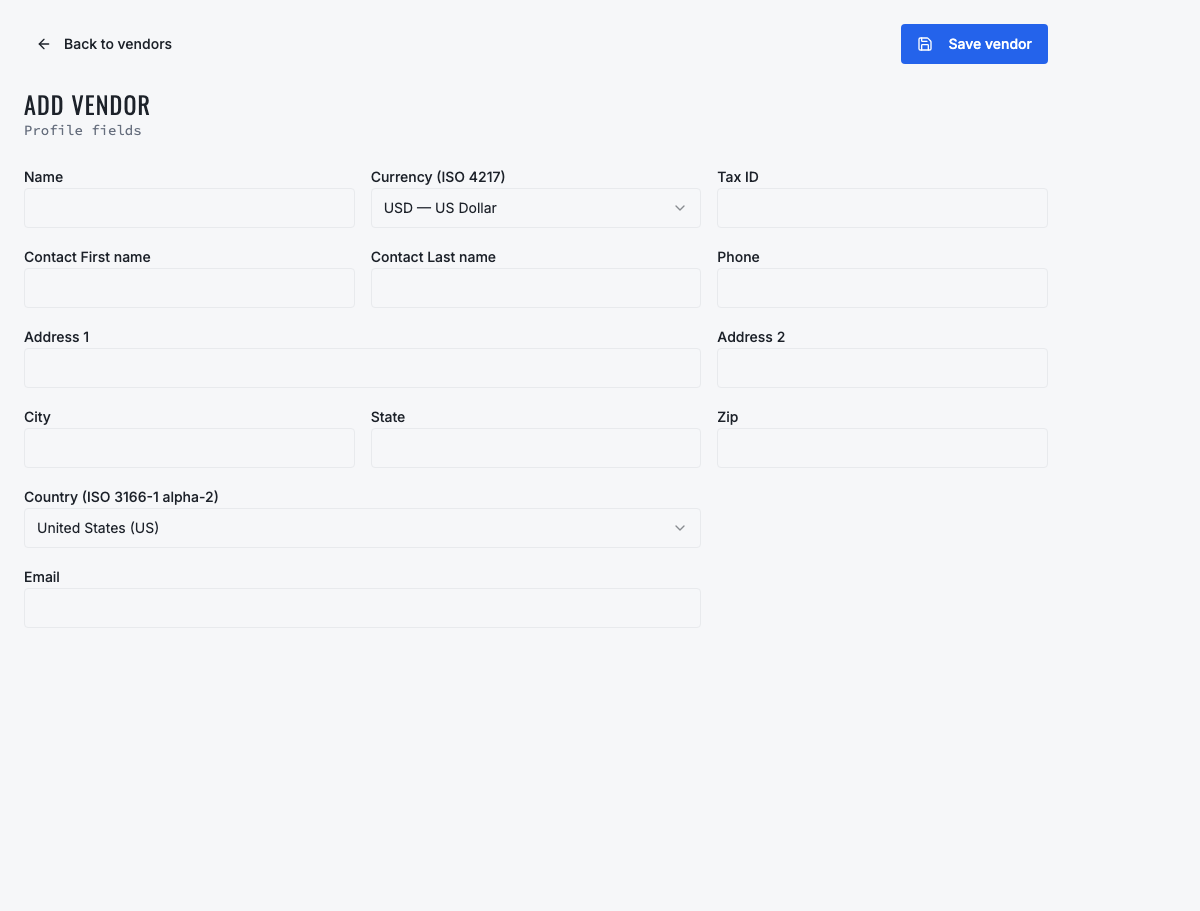
Create the supplier identity and contact information used by purchase orders.
Need the complete operating sequence? Read the purchase-order and consolidated-procurement guide →
Ready to move forward?
See the shop-to-fleet workflow
A personalized walkthrough of VMOTEK against your own operation. No pressure, no scripted pitch, bring the questions your team actually has.